GB 17120-2025 on safety technical specifications for metal forming machines is a mandatory national standard. When choosing a safety basis for an equipment project, first compare the actual model and configuration with its scope of application, then discuss specific clauses and documents.
Start from the equipment, its configuration and the task
When buying a press brake, shear or plate rolling machine, answer three questions first: which machine, in what configuration, for what task. Safety, machine accuracy and product quality solve different problems and must be settled separately; if the configuration or the way the machine is used changes, earlier support documents may need to be checked again.
- Equipment and identity: model, configuration and serial number, so documents match one specific machine.
- Intended task: access areas, operating mode and output requirements, which decide which risks and protections matter.
- Support documents: accompanying instructions, technical documents and site information, each with its own purpose and delivery scope.
What to consult for safety, accuracy and laser references
Laser processing machine safety, machine accuracy and design-stage risk assessment each have their own references. The links below help you find them; the formal scope of application and exclusions still come from each standard's scope clause.
- GB/T 18490.1-2017 laser processing machine safety
- GB/T 33644-2025 press brake accuracy
- GB/T 14404-2024 shear accuracy
Checking safety documents in four steps
The flow diagram below fixes the order. Each step produces something you can keep: a machine-to-configuration map, a task and access-area description, protection measures with report references, and a list of open items with owners.
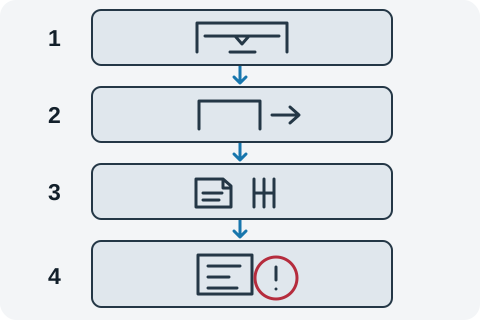
A concrete case: assume a press brake had its rear side access area changed during use, while the old safety documents still describe the original configuration and do not cover the new way of entering. The check exposes the gap at step two, task and access area, because the documented area no longer matches actual use.
- Record the gap: which access area is involved, what the old document says, how the machine is actually used, and why the old document no longer covers it.
- Fill the gap: ask the supplier or integrator to add excerpts on the configuration change, the coverage boundary, and the related risk assessment, together with verification records.
- Confirm both sides: supplier or integrator and user confirm together that the addition matches the actual equipment.
- Review and close: once the gap is resolved, review again to confirm documents, machine and actual use line up, then record the closure.
| Document type | Purpose | Delivery and access |
|---|---|---|
| Accompanying instructions and applicable declarations | Written information on intended use, operating conditions and scope | Confirm accompanying documents under the destination-market requirements and contract; retain them with the user |
| Technical documents held by the manufacturer | Records supporting design, manufacture and safety-related content | Held by the manufacturer; agree access, extracts or confidential review of relevant sections |
| Risk assessment documents | Which risks were identified, what protection was applied and what remains | Held by the manufacturer or integrator; agree explanations, extracts and access for the relevant risks and measures |
| Site user layout information | Where the machine sits on site, its access areas and walkways | Kept by the user and updated when the layout changes |
| Training and maintenance records | Whether operators and maintainers were trained, and whether maintenance follows its interval | Kept by the site user |
- Read the purpose column first: each document type solves a different problem and cannot stand in for another.
- Then the delivery column: accompanying instructions and declarations usually ship; technical documents and risk assessments held by the manufacturer are normally reviewed on request.
- Finally responsibilities: site layout, training and maintenance belong to the user, while the supplier or integrator explains the equipment side.
Note that a document check should not turn into a demand that every technical file ship with the machine. That demand is unrealistic and easily derails the discussion. A workable approach is to state which document types accompany the machine and which are reviewed on request, and to write down the access route and the responsible person for each.
Checking safety and production performance together
A useful safety record connects requirements to actual equipment evidence: which requirement, supported by which document or check, and with what result. Accuracy inspection is checked separately so production performance can be settled at the same time.
Protective measures do not all work the same way, and understanding the differences helps you ask better questions. A guard restricts contact by physical separation; an interlock stops or prevents a hazardous motion when a guard opens; an emergency stop lets a person interrupt motion in an abnormal situation. Each covers a different situation. What is actually required and how it is verified still come from the applicable standard text and the risk assessment.
| Protective measure | Main role | What to note in the record |
|---|---|---|
| Guards or fences | Reduces the chance of reaching a hazardous zone by physical separation | Openings and areas covered, material and fixing method |
| Interlock | Stops or prevents hazardous motion when the guard opens | Trigger condition, which motion stops, and how this is confirmed |
| Emergency stop | A person initiates a stop in an emergency; this does not replace guarding or energy isolation | Position, marking, and requirements for reset and restart |
Recording the discussion with the worksheet
Use the worksheet on this page in this order: fill in the machine model and configuration, then the basis document and scenario (for example "safety document check / equipment acceptance"), then work through the page topics recording the requirement source, conditions and method, evidence or reading, and any open item with its owner.
- Requirement source: the applicable document, its edition and the equipment scope it covers.
- Conditions and method: the relevant task, access area and how it is confirmed.
- Evidence or reading: the support document name and reference, or "to confirm" with the responsible person.
- You can add or remove check items on the page, copy the content, or download it as plain text. Everything stays on the current page, nothing is stored or sent automatically, so export before you leave.
The worksheet groups document leads by topic and passes no judgement; it produces no automatic conclusion about whether the equipment meets a requirement. Whether documents are complete is discussed by both sides by purpose, and whether requirements are met follows the applicable standard text and the risk assessment.
Edition and status
- Number
- GB 17120-2025
- Name
- Metalforming machinery—Safety technical specification
- Status
- Current
- Published
- 2025-10-05
- Effective
- 2026-05-01
- Full replacements
- GB 17120-2012, GB 6077-1985, GB 27607-2011, GB 28241-2012
- Partial replacements
- GB 28240-2012, GB 30458-2013, GB 26485-2011, GB 27608-2011, GB 28242-2012, GB 28760-2012, GB 28243-2012, GB 28244-2012
The official record distinguishes four full replacements and eight partial replacements. When citing an older document, establish the replacement relationship for the relevant content before selecting applicable requirements. Metadata and status checked: 2026-11-07.
Official records and obtaining the text
The official record page offers preview and download controls; the result of accessing them and their content has not been verified.
Confirm the edition through the official links below and obtain the full text from the issuing body or an authorised channel. Items, methods and limits should be based on the applicable standard text.
Reference check record
Before citing it in a new order, return to the issuing body's latest record to confirm the status.
- Status checked
- 2026-11-07